How to Detect AI-Generated Video: A Practical Guide for 2026
AI-generated video from Runway, Kling, and Veo is increasingly hard to spot. A practical guide to detecting synthetic video, deepfake face swaps, and manipulated footage using visual tells and detection tools.
In January 2026, a political attack ad circulated on X showing a presidential candidate making statements he never made. The video looked flawless. Natural lighting, realistic lip movements, appropriate background. It was viewed 14 million times before fact-checkers flagged it as AI-generated. By then, 59% of people who saw it believed the statements were real [1].
That incident was not an anomaly. It was a preview of what happens when AI-generated video becomes indistinguishable from reality and the public has no reliable way to tell the difference. Deloitte projected that AI-generated content could enable $40 billion in fraud losses by 2027 [2]. The video component of that threat is growing fastest.
This guide covers what AI video generation looks like in 2026, the two distinct categories of video deepfakes, the visual tells that still work (and the ones that don't), and what to do when you need to know whether a video is real.
Key Takeaways
- AI-generated video falls into two categories: fully synthetic (text-to-video) and face swap/reenactment deepfakes. Each has different tells.
- Visual artifacts like physics inconsistencies, temporal flickering, and hand anomalies still appear in fully synthetic video, but they are becoming less common with each model update.
- Face swap deepfakes reveal themselves through edge blending artifacts around the jawline and hairline, lip sync drift, and skin texture mismatches between face and neck.
- Human detection accuracy for high-quality AI video dropped below 50% in controlled studies by late 2025 [3]. Your eyes are not a reliable tool.
- Frame-by-frame analysis using detection tools catches temporal and frequency-domain artifacts that are invisible during normal playback.
The State of AI Video Generation in 2026
The landscape has changed dramatically in 18 months. In early 2025, AI-generated video was impressive but clearly synthetic. Movements were floaty, physics were wrong, and anything longer than four seconds fell apart. That is no longer the case.
Runway Gen-4.5 set the baseline for cinematic quality, with state-of-the-art motion, prompt adherence, and visual fidelity. Professional filmmakers use it for pre-visualization and b-roll. Its outputs have appeared in commercial productions without disclosure.
Kling 3.0 Omni from Kuaishou produces high-fidelity video with particularly strong performance on human subjects. It handles facial expressions and body movement more naturally than most competitors.
Google Veo 3.1 generates video with native audio, strong physical consistency, and complex camera movements. Integrated into Google's ecosystem, its outputs are increasingly difficult to distinguish from real footage.
Google Veo 2 generates video with accurate physics simulation and strong temporal consistency. Its integration with Google's ecosystem makes it particularly accessible.
Pika 2.5, MiniMax H3, and other tools have democratized the space, making video generation available to anyone with a browser. No technical expertise required.
The common thread: each successive model fixes the artifacts that people learned to spot in the previous generation. The tells that worked six months ago may not work today.
Two Types of Video Deepfakes
Understanding the difference between the two main categories is critical because they require different detection approaches.
Fully synthetic video (text-to-video, image-to-video)
These are videos created entirely by an AI model from a text prompt, a reference image, or both. No real footage is involved. The entire scene, including people, environments, lighting, and motion, is generated from scratch.
Examples: Runway generating a street scene from a text prompt. Kling creating a product demonstration from a single product photo. Pika animating a still portrait into a talking head.
The tells in fully synthetic video are primarily about physics, temporal consistency, and fine details that generators still struggle with.
Face swap and reenactment deepfakes
These start with real video footage and modify it. A face swap replaces one person's face with another. A reenactment deepfake puppets an existing face to say or do things the person never did. The background, body, and context remain from the original footage.
Examples: A scammer's face replaced with a relative's face on a video call. A politician's face puppeted to deliver a fabricated speech. A celebrity's likeness mapped onto someone else's body.
The tells in face swap deepfakes concentrate around the boundary where the synthetic face meets the real footage.
Visual Tells for Fully Synthetic Video
These artifacts appear in video generated entirely by AI models. They are becoming less frequent as models improve, but they remain detectable in most current-generation output.
Physics inconsistencies
AI models simulate the appearance of physics without understanding physics. This produces errors that a real camera could never capture:
- Water behavior. Splashes that defy gravity, ripples that propagate incorrectly, liquid that moves through solid objects. Water remains one of the hardest phenomena for video generators to simulate accurately.
- Reflections. Mirrors and reflective surfaces that show the wrong content, reflections that don't match the angle of the surface, or reflections that are missing entirely.
- Shadows. Shadows that fall in the wrong direction relative to the light source, shadows that appear and disappear between frames, or multiple inconsistent shadow directions in a single scene.
- Object interactions. Objects that pass through each other, collisions with no reaction, or gravity that behaves differently for different objects in the same frame.
Temporal artifacts
These are the artifacts that distinguish AI video from AI images. They appear across frames rather than within a single frame:
- Flickering. Textures, patterns, or small details that change inconsistently between frames. A tile pattern on a floor might subtly shift. A logo on a shirt might reshape. These are invisible at normal playback speed but obvious when stepping through frame by frame.
- Morphing transitions. When a scene changes perspective or a person moves, objects in the background may smoothly morph rather than remaining fixed. Real cameras capture fixed geometry from different angles. AI generators sometimes re-imagine the geometry.
- Inconsistent details. The number of buttons on a shirt changes. A necklace appears and disappears. A building in the background gains or loses windows. The model regenerates details that it cannot maintain across frames.
Hand and finger anomalies
The hand problem that plagued AI images has been partially solved, but video makes it harder. Hands in motion across multiple frames still frequently show:
- Fingers that merge or split during movement
- Finger counts that change between frames
- Grips on objects that are physically impossible
- Wrists that bend at unnatural angles during gestures
Text rendering
Text in AI-generated video remains a weak point. Look for:
- Letters that shift or morph between frames
- Words that are almost but not quite readable
- Signs or labels where the text changes content across the video
- Numbers that are internally inconsistent (a clock showing impossible times, a license plate changing digits)
Unnatural camera movement
Real cameras have physical constraints. They have mass, they shake, they follow the mechanics of the device holding them. AI-generated camera movement can feel too smooth, or exhibit small discontinuities that don't match any physical camera system.
Visual Tells for Face Swap Deepfakes
Face swap artifacts are concentrated at the boundary between the synthetic and the real. The generated face must blend seamlessly with real footage, and this boundary is where the technology still struggles.
Edge blending at jawline and hairline
The single most reliable tell. Where the generated face meets the real neck, ears, and hair, look for:
- A faint halo or blur along the jawline that is not present elsewhere in the image
- Hair that seems to clip through the face boundary rather than falling naturally
- A subtle color shift between the skin of the face and the skin of the neck or ears
Eye gaze inconsistency
The eyes in a face swap are generated independently from the body. This can produce:
- Gaze direction that does not match where the person's head is oriented
- Both eyes tracking slightly differently, creating a subtle uncanny effect
- Eye movement that feels disconnected from the conversation or environment
Lip sync drift
Voice and face are processed by separate systems in real-time deepfakes. Over the course of a call or clip:
- Lip movements may fall slightly behind or ahead of the audio
- Certain phonemes (sounds that require wide mouth opening or lip compression) may not render correctly
- The drift tends to worsen over time, becoming more noticeable in longer clips
Blinking patterns
Early deepfake models infamously failed to generate natural blinking. Modern systems have addressed this, but blinking in face swaps can still appear:
- Too regular (mechanical rhythm rather than natural irregular intervals)
- Too infrequent (some models reduce blink rate to avoid rendering artifacts)
- Asymmetric in timing (one eye closing slightly before the other in a way that differs from the person's natural pattern)
Skin texture mismatch
The generated face and the real body come from different sources. Even with sophisticated blending:
- The face may appear smoother or more detailed than the surrounding skin
- Pore patterns may shift abruptly at the jawline
- Lighting on the face may not perfectly match the lighting on the neck and shoulders
- The face may appear to "float" slightly above the real skin layer
Why Human Detection Is Failing
If you read the section above and thought "I could spot those," consider this: a 2025 study published in IEEE Transactions on Information Forensics and Security tested 2,000 participants on their ability to identify deepfake video clips. Participants were shown 30-second clips from the latest generation of models. Average detection accuracy was 46.1%, lower than a coin flip [3].
The problem is not carelessness. The problem is that:
- Artifacts are transient. A hand anomaly that lasts two frames in a 30fps video means it is visible for 66 milliseconds. Your conscious visual system cannot process it at that speed.
- Generators are trained adversarially. The models that generate video are trained specifically to fool discriminators. Each artifact that humans learn to spot gets trained away in the next model version.
- Compression destroys evidence. By the time a video reaches you through social media, messaging apps, or video platforms, it has been re-encoded multiple times. Each re-encoding removes subtle artifacts that might have been visible in the raw output.
- Volume overwhelms scrutiny. You might catch a deepfake if you watched 10 seconds of video frame by frame for five minutes. You will not catch it while scrolling through a feed of hundreds of clips.
The visual tells listed above are real and worth knowing. But relying on them as your primary detection method is like relying on your nose to detect carbon monoxide. Sometimes you might notice something. Often you will not.
Tool-Based Detection
Automated detection tools analyze video at a level that human perception cannot reach. They work across three main dimensions:
Temporal analysis
Detectors examine how pixel values, noise patterns, and statistical properties change across frames. Real video captured by a physical camera has characteristic temporal patterns determined by the sensor, the lens, and the encoder. AI-generated video has different temporal signatures, even when each individual frame looks photorealistic.
Frequency domain analysis
Just as with images, video frames can be transformed from the spatial domain to the frequency domain using mathematical transforms. Generation artifacts that are invisible in individual pixels become visible as anomalous patterns in the frequency spectrum. Temporal frequency analysis (examining how frequency patterns change across frames) adds another dimension that is unique to video detection.
Statistical fingerprinting
Different generation models produce output with characteristic statistical properties. A detector trained on output from Runway, Kling, Veo, and other generators learns to identify each model's fingerprint. This works even when the visual output is indistinguishable to the human eye, because the underlying mathematics of each model leave measurable traces.
How to use a detection tool for video
- Save the video file. Download the original file when possible rather than screen-recording it. Screen recordings add compression and lose metadata.
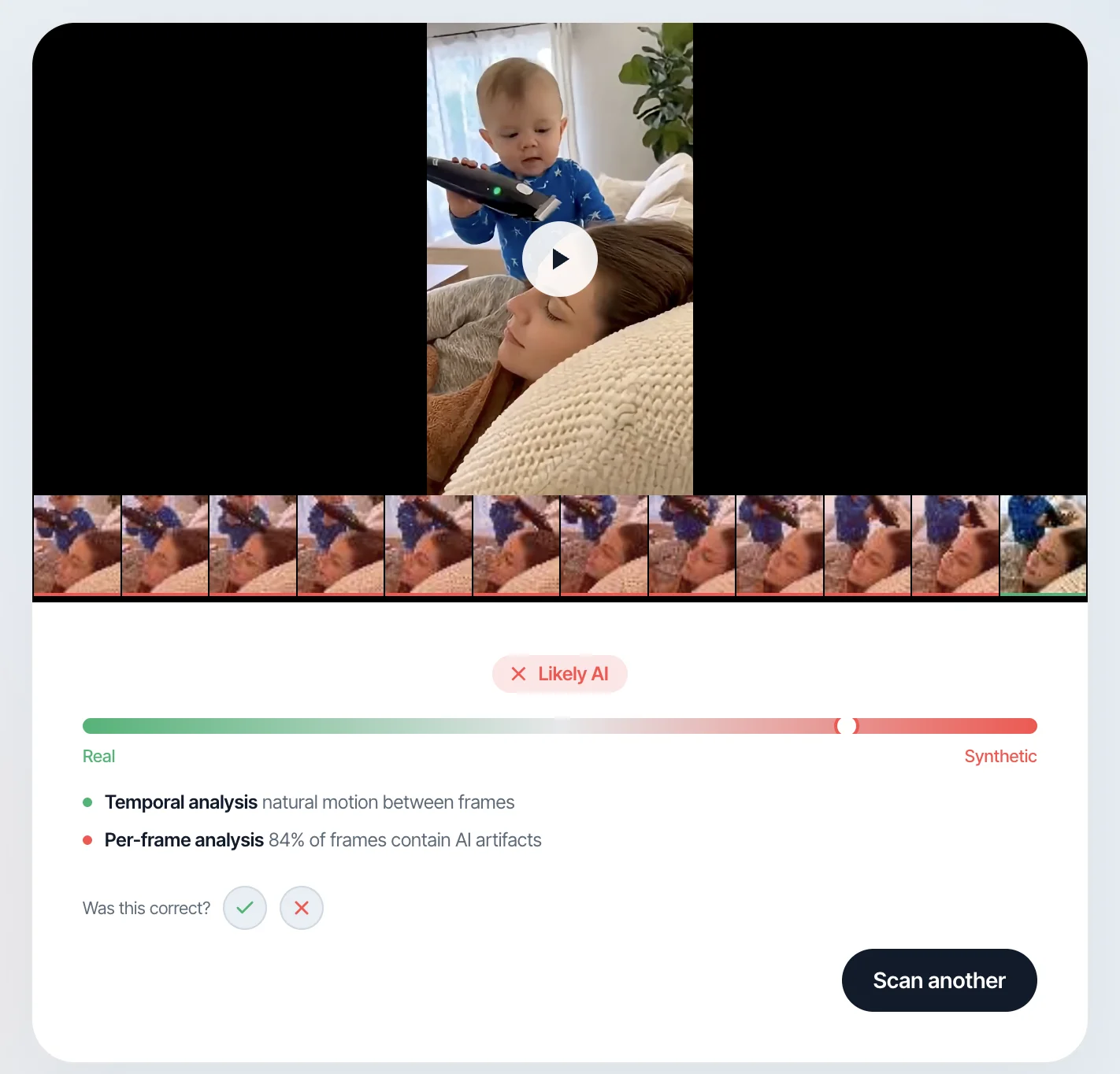
- Upload to a detection tool. Witness accepts video uploads and performs frame-by-frame analysis, checking for temporal artifacts, statistical anomalies, and generation fingerprints.
- Review the result. A reliable tool provides a confidence score, not just a binary verdict. High confidence (above 90%) is a strong signal. Low confidence means the tool is uncertain, and you should treat the result as one data point among several.
- Combine with context. Where did the video come from? Who shared it? What is it trying to make you believe, feel, or do? Detection results plus context gives you a much more complete picture than either alone.
What to Do When You Suspect a Video Is Fake
1. Don't share it
The damage from a deepfake video is proportional to its reach. If you are not sure whether a video is real, the single most impactful thing you can do is not amplify it. Every share, repost, or forward extends its reach to people who will not question it.
2. Check with a detection tool
Upload the video to a detection tool like Witness. Frame-by-frame analysis takes seconds and provides information you cannot obtain by watching.
3. Look for the original source
Trace the video back as far as you can. Who posted it first? Is there an original source with higher resolution? Does the original poster have a verified identity and a history of authentic content? Deepfake videos often appear from anonymous or newly created accounts.
4. Cross-reference the claims
If the video shows a public figure saying something, check whether any reputable news source has reported the statement. If a video of a politician making a dramatic claim has not been covered by any news outlet, that absence is informative.
5. Report it
If you determine or strongly suspect a video is a deepfake, report it on the platform where you found it. Most major platforms have specific reporting mechanisms for manipulated media. If the deepfake involves fraud, impersonation, or abuse, report it to relevant authorities. In the US, the FBI's IC3 at ic3.gov accepts reports of AI-enabled fraud.
The Road Ahead
AI-generated video will continue to improve. The visual tells described in this guide will become less reliable over time, just as the tells for AI images have faded. The arms race between generation and detection is ongoing, and generators have the inherent advantage of only needing to fool human perception, which is fixed.
This means the shift from human detection to tool-based detection is not optional. It is inevitable. The question is whether you make that shift proactively or after a deepfake video has already caused damage.
The practical habit is the same one that works for images: pause before you react, check before you share, and verify before you act on anything you see in a video that carries real consequences. Your eyes are powerful instruments. For this particular task, they need help.
Related reading
- Every Type of Deepfake Generator Explained
- Messenger Fake Video Call Scams: How They Work
- Why Your Eyes Can't Spot Deepfakes
- [1]Sumsub, "Identity Fraud Report 2025," https://sumsub.com/identity-fraud-report/
- [2]Deloitte Center for Financial Services, "Generative AI deepfakes and the future of financial fraud," May 2024, https://www2.deloitte.com/us/en/insights/industry/financial-services/financial-services-industry-predictions/2024/deepfake-banking-fraud-risk-on-the-rise.html
- [3]University of Waterloo, "Human detection of machine-manipulated media," 2025, https://uwaterloo.ca/news/deepfake-study