How to Tell If Someone You Met Online Is Real
A 5-minute checklist for verifying a stranger online. Reverse image search, AI detection, video call challenges, and cross-platform checks. Covers AI-generated profile photos and deepfake video filters.
You matched with someone. The profile looks great — good photos, interesting bio, messages that feel attentive. But something is slightly off, and you can't name it.
Maybe they're always unavailable for a call. Maybe the photos look a little too polished. Maybe they declared strong feelings faster than anyone you've met in person ever has.
The instinct to check is right. And the good news is that checking takes about five minutes.
Why this has gotten harder
The original catfish playbook was simple: find a stranger's photos online, steal them, build a fake identity. Reverse image search could catch it by finding the original.
That model is mostly obsolete. The new version is worse.
AI image generators — Midjourney, Stable Diffusion, Flux, and dozens of commercial tools — can produce a convincing, unique headshot in seconds. The face has never existed. There is no original photo to find anywhere on the web. Reverse image search returns nothing, not because the photo is real, but because it was synthesized from scratch.
In 2024, the FTC received over 70,000 romance scam reports — and estimates that only about 5% of fraud victims ever file a formal complaint, which means the real number of people affected is closer to 1.4 million annually.[1] Romance scams cost Americans over $1.1 billion in 2023, and the figure has climbed every year since.[2]
A significant and growing share of those scams now use AI-generated profile photos.
The absence of reverse image search results no longer means anything. An AI-generated face will return zero matches because there is nothing to match. The check you used to rely on has a blind spot the size of every AI tool released in the last three years.
The 5-minute verification checklist
Work through these in order. Stop when you have a clear answer.
Step 1 — Reverse image search (catches stolen real photos)
Still worth doing. Drag their photo into Google Images or Google Lens. Upload to TinEye for a second check.
What you're looking for:
- The same face appearing under a different name
- The photo appearing on a stock image site (Shutterstock, Getty, Unsplash)
- The photo appearing on news articles, other social profiles, or adult content sites
If reverse search finds a match: almost certainly fake. If it finds nothing: inconclusive — you need to keep checking.
Step 2 — Run the photo through an AI detector
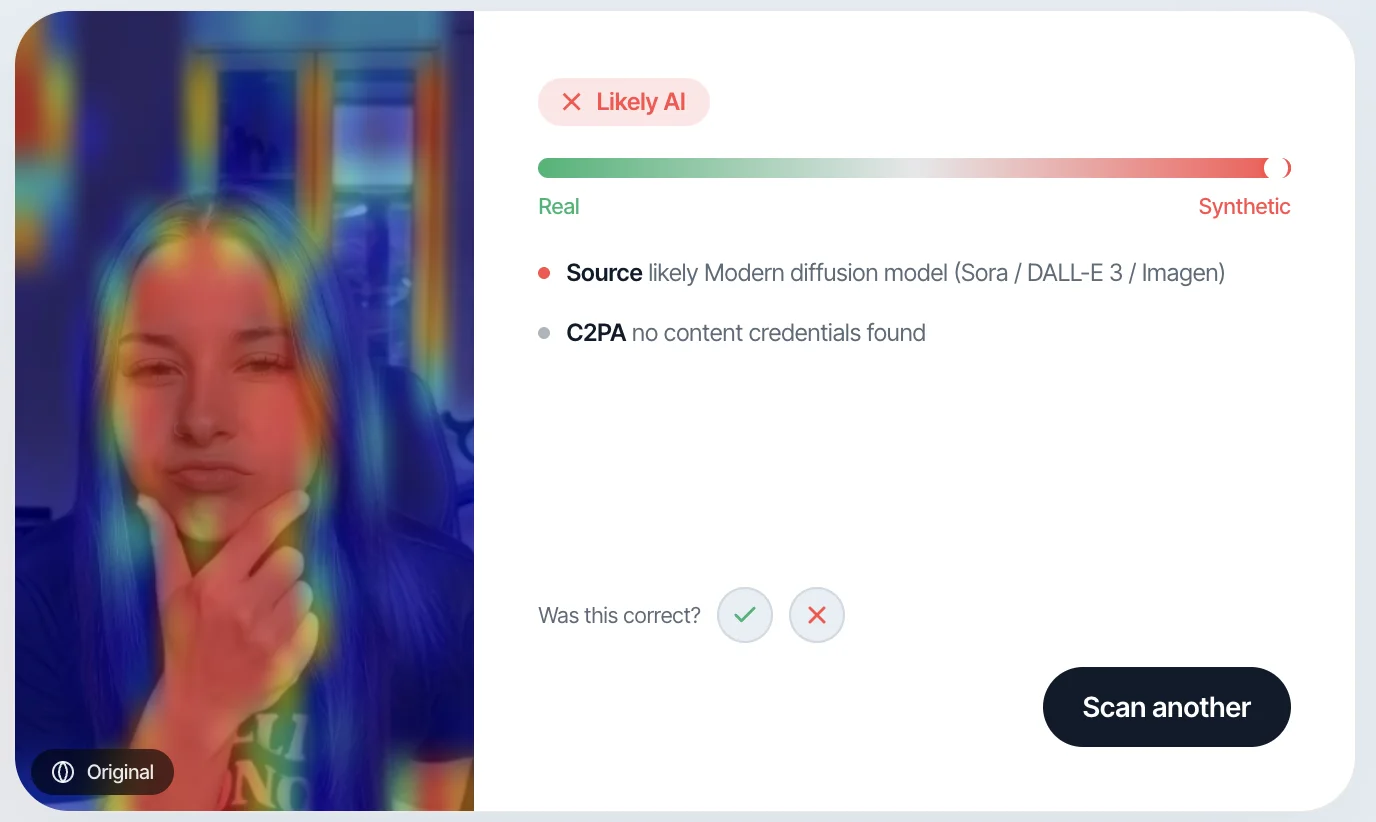
Reverse search misses synthesized images. AI detectors specifically look for signs of generation — statistical artifacts in the pixel data, unnatural frequency signatures, inconsistencies in how light behaves across the image.
Run the profile photo through Witness — free, no account required, nothing stored. Upload the photo and you get a verdict in seconds. A high synthetic probability on a dating profile photo is a significant red flag.
What to look for yourself:
- Hands: Fused fingers, extra joints, impossible grip positions
- Ears: Asymmetric or melted-looking, especially where they meet the jaw
- Jewelry: Earrings that don't match side to side, necklaces that clip into the neck
- Background: Blurry in ways that don't match the focal length, text that looks like letters but doesn't resolve into words
- Eyes: Catchlights (reflections) that don't match across both eyes, or that show different environments
The "too perfect" test. Real people's photos include candid moments: imperfect lighting, mid-expression frames, photos clearly taken in a specific recognizable place. A profile where every single photo is model-tier and the background is always generic is unusual. Real people don't consistently photograph that well.
Step 3 — Cross-platform check
Real people exist in more than one place online. A person who only exists on one platform — no Instagram, no LinkedIn, no Facebook, nothing — is not impossible, but it's uncommon enough to warrant attention.
Free username lookups:
- Lullar — searches 170+ platforms by username
- Google:
"[their name]" site:instagram.comorsite:linkedin.com - Check if the username they use appears anywhere else, and whether the accounts match the story they've told you
Look for consistency: same approximate age, same rough description of their life, photos that match. Inconsistency is the signal — different city on LinkedIn vs. what they've told you, different name on Twitter, no record matching someone who claims a specific profession.
Step 4 — Request a live video call with a specific challenge
This is the single most reliable check — with an important caveat.
Ask for a video call. If they refuse more than once, treat that as a strong red flag. Consistent excuses — bad camera, bad connection, odd hours, shyness — are a pattern.
But: deepfake video filters now exist. Real-time AI face-swapping tools can overlay a different face onto a live video feed. A casual video call is no longer fully reliable. To test it:
If they do all of this cleanly and naturally, the probability of a deepfake filter drops substantially. If they hesitate, make excuses, or the video glitches specifically on these requests, that is meaningful.
If you managed to screenshot the video call, you can also run that screenshot through Witness — the same AI generation detector that works on photos also detects deepfake video frames.
Step 5 — Audit the story for internal consistency
Scammers manage multiple fake relationships simultaneously. That creates pressure, and pressure produces inconsistencies.
Keep a simple log of what they've told you:
- Job: What they do, where, since when
- Location: City, neighborhood, any specifics they've mentioned
- Family: Names of siblings, parents, any personal details shared
- Timeline: When did events they described happen?
Real people's stories don't contradict themselves over weeks. If someone told you they were an only child in week one and mentioned a brother in week four, that is not a slip — it's a sign they are running from a script.
Red flags vs. green flags: the full table
What to watch for in AI-generated photos
Most AI image generators produce subtle but consistent failure patterns. These are not visible at casual glance — they require looking closely.
Six things AI still gets wrong:
- Hands — fingers that fuse, split, or have impossible joint positions
- Teeth — too uniform, too many, or edges that don't follow normal anatomy
- Earrings — asymmetric between left and right, or passing through the earlobe
- Background text — letters arranged to look like words but that don't say anything
- Catchlights — the small reflections in eyes; in real photos they show the same light source in both eyes; in AI images they often differ or are invented
- Hair at edges — strands that dissolve into the background rather than ending cleanly
None of these are definitive on their own. A real photo can have blur. An AI image can get all of these right. They are signals, not proof. Use an AI detector alongside your own visual check.
Free tools, compared
If you've already shared personal information
If you've given them your phone number, address, workplace, or financial details before you realized something was off:
Don't send money. Cryptocurrency, wire transfer, gift cards — none of this is recoverable. If they've asked for money for any reason — emergency, travel to visit you, investment opportunity — stop all contact.
Report it:
- FTC: reportfraud.ftc.gov — online form, takes five minutes
- FBI IC3: ic3.gov — for financial losses
- The platform they contacted you on (every major platform has a report/block flow)
If intimate images were shared and you're concerned:
- StopNCII — hashes your images so platforms can block them from spreading, free, image never leaves your device
- NCMEC Take It Down — for anyone under 18
The bottom line
For more on protecting yourself in online dating scenarios, visit our dating safety resource page.
The check that used to work — reverse image search — has a gap: AI-generated images return nothing because they have no original. That absence is not a clearance.
The reliable approach is to combine checks: reverse search for stolen real photos, AI detection for synthesized faces, cross-platform lookup for identity consistency, and a live video call with a challenge that filters can't cleanly pass.
None of these is definitive alone. Together, they answer the question in about five minutes.
Related reading
- Romance Scam Red Flags That Actually Matter in 2026
- Is This Profile Photo AI-Generated? A Checklist
- Messenger Fake Video Call Scams: How They Work
- [1]Federal Trade Commission, Consumer Sentinel Network Data Book 2024. FTC estimates only ~5% of fraud victims file formal complaints. Available at ftc.gov/enforcement/consumer-sentinel-network.
- [2]Federal Trade Commission, Consumer Sentinel Network Data Book 2023, p. 10 — romance scams: $1.14 billion reported lost. Available at ftc.gov.